WBCE CMS Forum
WBCE CMS – Way Better Content Editing.
Du bist nicht angemeldet.
- Themen: Aktiv | Unbeantwortet
#1 18.02.2024 15:39:09
- stefanek
- Core-Team
AddonFileEditor with ACE Editor
Hello LT,
so, here we go.
It's not only the Ace implementation.
Over the months I have included some features that will make the work with AFE more convenient.
One feature is: if you edit a file and save&return to the overview the window will scroll to the file you just edited and will show a green background for a few seconds.
There are more minor improvements and changes.
But let us first see if this Ace implementation is any good to begin with.
The mode (day or night) and the font and font-size come from the settings in the CodeMirror Configurator AdminTool.
Note: there are only wbce-day and wbce-night currently available with Ace/AFE. This means if you select any dark mode in the CodeMirror Configurator AdminTool wbce-night will be used. The same goes for any bright mode, in this case wbce-day will be used.
Please test it and let me know what impressions you get.
Of course all testers and feedback, as always, welcome.
Christian
Dowloan removed. Newer version down the thread.
Beitrag geändert von stefanek (21.02.2024 20:23:38)
“Success is the progressive realization of a worthy ideal.” ― Earl Nightingale
Offline
- Liked by:
losttrip
#2 18.02.2024 21:54:40
- losttrip
- Mitglied
Re: AddonFileEditor with ACE Editor
Hi Christian,
Your commitment is commendable, thank you. I trust your sound thinking and judgement on which editor is best to try.
I have installed and tested a little. First impression is, it's perfect! I am a little at a loss for more descriptive words, because although there is obviously a lot of behind the scenes work done by you, the end result it... it just seems like a working text editor to a humble user like myself. Hope that makes sense.
I will throw out some more feedback, if that's okay, as I continue using it in practice. Nothing I say will ever be meant as negative, just comments from a user.
Feedback:
1. I think the "green background" highlighting feature will be really helpful. Great addition!
2. I notice when I go into fullscreen (F11) mode, the editor does not completely fill the screen. This doesn't bother me in the least, just wanted to point it out. You can see the admin window along the right side: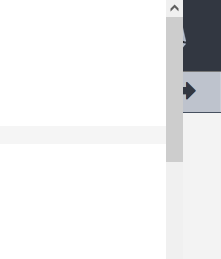
I checked the css and it looks like the id="code_area" has more specificity than the ACE class .fullscreen 100% width.
in backend.css
#mod_addon_file_editor .code_area {
  width: 98%;
}
which overrules the width in inline.css
.fullscreen {
  position: fixed;
  top: 0;
  left: 0;
  width: 100%;
  height: 98vh !important;
  z-index: 9999;
}
<div id="code_area" class="code_area ace_editor ace-wbce-day fullscreen" style="font-size: 14px; font-family: Proggy; height: 60vh;">3. Undo (ctrl-z) ultimately deletes all code. Not sure if this is how ACE is built, but if you open a file and click ctrl-z, all code is deleted from the editor. Redo (ctrl-y) does bring it back, but it was a bit of a shock staring at a blank screen. I'm used to ctrl-z in sequence taking me back step by step through my changes until I arrive at the initial state of the code. But, now, if I make three subsequent code changes, then click ctrl-z three times, I arrive back to the initial state... but if I click ctrl-z one more time - the code window is cleared.
4. The Search and replace is perfect. Hopefully users will know how to find it (ctrl-f) and get the most out of it. The Automatic indent and outdent is awesome. Thank you!
5. The "HotPink" colour for the file paths caught me off guard. I had a flashback to coming home to find my significant other had painted a bathroom in our brand new home that exact colour. Surprise!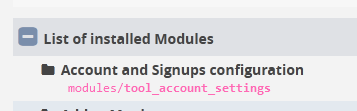
6. Is the "Line wrapping" setting something that could be included in the CodeMirror Configurator AdminTool? I think I prefer the default no-wrap, but I can imagine there may be times where switching to wrap would come in handy.
I'll leave it at that for now. Ultimately, I want to thank you for your efforts to truly improve this already fantastic CMS.
Tomorrow is Family Day here in Canada. I wish you and everyone here a wonderful day of quality time with family.
Beitrag geändert von losttrip (18.02.2024 21:58:27)
Offline
- Liked by:
stefanek, florian
#3 18.02.2024 22:29:47
- stefanek
- Core-Team
Re: AddonFileEditor with ACE Editor
Hello LT, thank you for the appreciative words.
I will look into the issues you mentioned tomorrow.
The full-screen mode is a simple solution I wrote myself because the internal solution from Ace would need many more files (something that really made no sense to me, so I wrote a few lines of JS to do the same -- but this needs some more tweaking).
The CTRL+Z... I will look into it. It should actually behave as you describe, so possibly a bug. To be honest I missed it so will have to take a look.
The HotPink... haha... yeah... it's a bit extatic. I will change it to another color. One that doesn not draw so much attention (or takes you on a time travel  ).
).
It was important to me to have the path to the addon as previously there was only the Name of the addon which is often times very different to the name of the directory.
More soon.
Enjoy your family time and greetings to Canada.
Christian
“Success is the progressive realization of a worthy ideal.” ― Earl Nightingale
Offline
- Liked by:
losttrip, florian
#4 19.02.2024 01:13:23
- florian
- Administrator
Re: AddonFileEditor with ACE Editor
Looks very good. Thank you very much.
I was a bit puzzled to find the module under its "new old name" AFE instead of cwsoft-afe, but well, yes, since cwsoft unfortunately has left the community long time ago and you adapted a lot of changes, renaming the module is legit. The module description (german) has to be changed accordingly though.
I can confirm the fullscreen appearance, but imho it's no issue when some parts of the main screen "behind" keep visible.
Only a remark, the fullscreen mode does not work with Opera, which seems merely to be an Opera issue, see https://stackoverflow.com/a/17128342
The CTRL-Z behaviour is indeed a little bit dangerous, but not uncommon. if you hit the CTRL-Z too often/too long the window becomes blank. It's like you have pasted code into a local editor (like Notepad++) from the clipboard, if you go back to far the code disappears there too - idk if there's really a way to stop that behavoiur in ACE.
One question:
Maybe it's possible to remove the thin grey line at pos. 80?
Beside of this, e.g. this has nothing to do with the ACE implementation:
There seems to be planned (?) to integrate an external / API based editor for images (pixlr), but this does not work yet. Hitting the edit button besides of images leads to a 404 on an URL like this:
http://example.com/modules/cwsoft-addon-file-editor/code/action_handler.phphttp://www.pixlr.com/editor/?image=http://example.com/templates/mytemplate/clouds.jpg&title=clouds.pixlr.jpg&method=GET&loc=de&exit=http://dev4.wbce-cms.eu/0702&referrer=http://example.com&target=http%3A%2F%2Fexample.com%2F0702%2Fmodules%2Fcwsoft-addon-file-editor%2Fcode%2Fget_pixlr_image.php%3Fimg_path%3D%2Ftemplates%mytemplate%2Fclouds.jpgBeitrag geändert von florian (19.02.2024 01:15:07)
Wir Benötigen: Cents, Euros... jetzt spenden!
Offline
#5 19.02.2024 01:52:33
- stefanek
- Core-Team
Re: AddonFileEditor with ACE Editor
Thanks Florian.
With regards to the name, I only changed the display name of the Tool in the AdminTools overview. The directory name remains as is and of course this is not meant as any form of disrespect. It is actually listed in the repository just the same way https://addons.wbce.org/pages/addons.ph … em&item=28 (except for the brackets, I used [AFE] not (AFE)).
We almost always call it colloquially as simply AFE, which stands for Addon File Editor. We can of course start to call it CAFÈ .
Regarding the www.pixlr.com image handler. I am not privy to that so much. I know it worked at some point in time when Doc implemented it, but I haven't used it (only some experimentation when it was first implemented). I have not looked into it any further and why it is disabled (EDIT: or was it me who disabled it ???). I can look into it at some later time if it is really something that's needed.
Maybe it's possible to remove the thin grey line at pos. 80?
I am sure it can be done via CSS. It's hardcoded in the javascript files, theme-wbce-day.js and -wbce-night.js, respectively.
We can also include other themes from the package. I just don't know which of those they provide would be prefered and I am not happy with including all of them. Therefore I adjusted 2 themes to make them look similar to the wbce-day and wbce-night ones I did for CodeMirror (since no one complained ;-))
The CTRL+Z issue,
I will look into it. It's possible that I can handle it; I have a suspicion why it happens. But I will need to have a look.
How do you people like the other new features?
The coming back after saving to the file you have been working on?
It's now also possible to edit code of SVG files. Before it was only shown in the browser when clicked on. Now both options are available.
Best regards,
Christian
Beitrag geändert von stefanek (19.02.2024 01:53:57)
“Success is the progressive realization of a worthy ideal.” ― Earl Nightingale
Offline
#6 19.02.2024 06:44:16
- losttrip
- Mitglied
Re: AddonFileEditor with ACE Editor
There are reports of this crtl-z issue on google, and suggested solutions, but they seem to be from a few years ago.
The conversations seem to center around the Ace undo manager settings and also:
editor.session.setValue("the new text here"); // set value and reset undo historyOffline
- Liked by:
stefanek
#7 19.02.2024 08:35:55
- florian
- Administrator
Re: AddonFileEditor with ACE Editor
@stefankek
Thanks for your efforts.
With regards to the name
Maybe it should be called WBCE AFE to avoid confusion with the AFE of the colleagues™
We can also include other themes from the package.
I don't think we need more than two themes, probably most users stay with the default theme. It's good if theres a dark mode theme too.
The coming back after saving to the file you have been working on?
Very useful, thx
It's now also possible to edit code of SVG files
I always edit SVG with Affinity Designer 
Regarding the www.pixlr.com image handler.
Probably there's just missing a question mark somewhere to generate a working URL. But never mind, if this feature was implemented in the stone age and obviously did not work since then, probably noone ever has used it, so just discard it.
Wir Benötigen: Cents, Euros... jetzt spenden!
Offline
- Liked by:
stefanek
#8 19.02.2024 12:16:08
- stefanek
- Core-Team
Re: AddonFileEditor with ACE Editor
There are reports of this crtl-z issue on google, and suggested solutions, but they seem to be from a few years ago.
The conversations seem to center around the Ace undo manager settings and also:
editor.session.setValue("the new text here"); // set value and reset undo history
This is exactly what I have been suspecting.
The content of the Ace instance is populated on load. Before it is populated the element is empty. Therefore when you go back you and up at the point before the contents where populated (inserted) into the element.
Christian
“Success is the progressive realization of a worthy ideal.” ― Earl Nightingale
Offline
#9 19.02.2024 12:26:39
- stefanek
- Core-Team
Re: AddonFileEditor with ACE Editor
@stefankek
Thanks for your efforts.With regards to the name
Maybe it should be called WBCE AFE to avoid confusion with the AFE of the colleagues™
I would just leave it as is for now. Just `Addon File Editor [AFE]`.
It's now also possible to edit code of SVG files
I always edit SVG with Affinity Designer
Yes, Affinity Designer is also my favorite tool. It really works wonderfully.
But sometimes you may want to change just one color or a line of Text in the file. Then it's good to have a way to reach the code of the file.
Regarding the www.pixlr.com image handler.
Probably there's just missing a question mark somewhere to generate a working URL. But never mind, if this feature was implemented in the stone age and obviously did not work since then, probably noone ever has used it, so just discard it.
Agreed. Will have a look later and decide.
Christian
Beitrag geändert von stefanek (19.02.2024 12:27:07)
“Success is the progressive realization of a worthy ideal.” ― Earl Nightingale
Offline
#10 21.02.2024 19:39:00
- stefanek
- Core-Team
Re: AddonFileEditor with ACE Editor
cwsoft addon file editor - missing menu bar: no more.
Please check the newest updates.
I think I addressed all the issues from the thread. And yes, brought back a menu bar. It's self made but should do.
Please test and let me know what impressions you get.
Best regards,
Christian
Download file removed, newer version down the line.
Beitrag geändert von stefanek (22.02.2024 15:02:25)
“Success is the progressive realization of a worthy ideal.” ― Earl Nightingale
Offline
- Liked by:
losttrip
#11 21.02.2024 20:22:50
- florian
- Administrator
Re: AddonFileEditor with ACE Editor
Perfect. Everything is working like expected and looks really, really good. 
Wir Benötigen: Cents, Euros... jetzt spenden!
Offline
- Liked by:
stefanek
#12 21.02.2024 21:27:42
- stefanek
- Core-Team
Re: AddonFileEditor with ACE Editor
Sounds good, Florian. Thank you.
It's not yet the final version but it's highly workable.
Did you catch the CTRL+S feature by chance?  (only in AjaxSave mode)
Christian
“Success is the progressive realization of a worthy ideal.” ― Earl Nightingale
Offline
#13 22.02.2024 02:47:21
- losttrip
- Mitglied
Re: AddonFileEditor with ACE Editor
You've gone over and above. Well done.
I did notice that there doesn't seem to be syntax colouring in js files.
e.g. in your previous version 3.2.7.beta: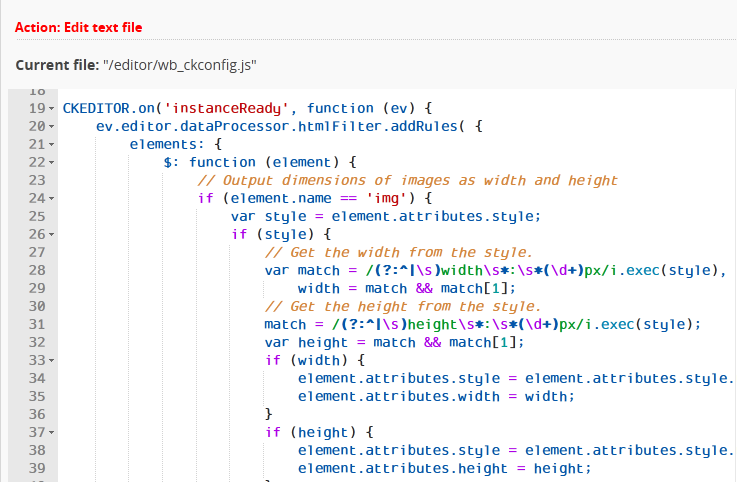
now looks like this in 3.2.8.beta: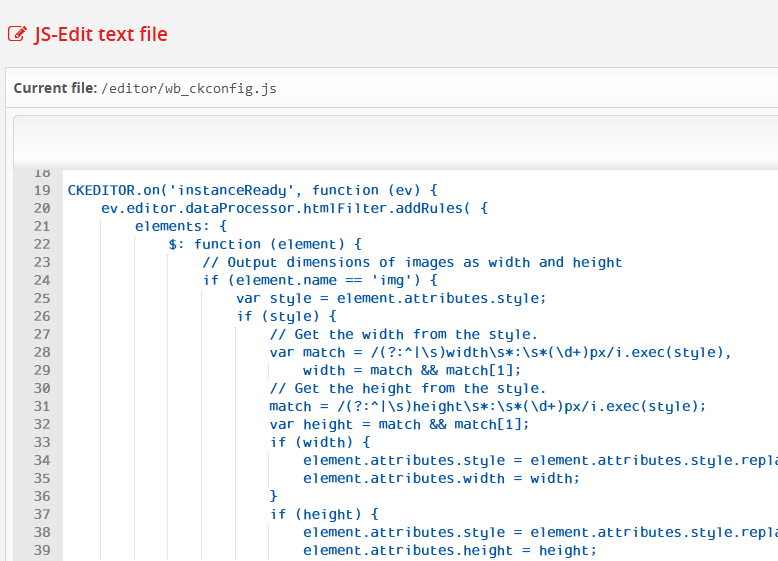
Offline
- Liked by:
stefanek
#14 22.02.2024 03:00:55
- losttrip
- Mitglied
Re: AddonFileEditor with ACE Editor
Not being critical, just wanted to point this out.
If you open the search dialogue, then close it (either by clicking the "x" or "all" ), you have to click the magnifying glass twice to open the search dialogue again.
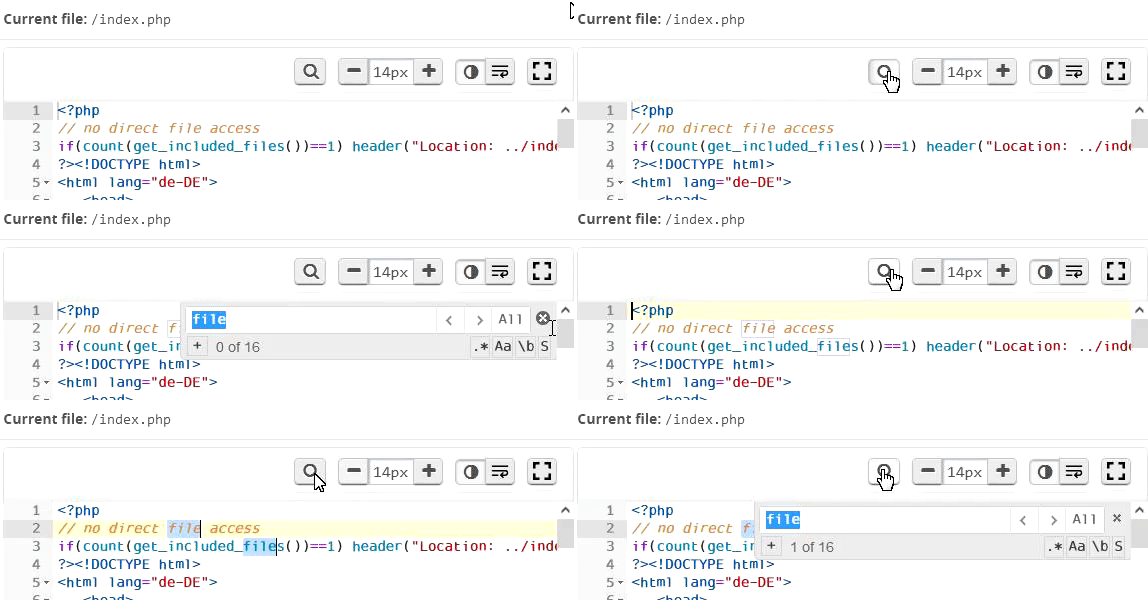
Offline
- Liked by:
stefanek
#15 22.02.2024 03:57:01
- stefanek
- Core-Team
Re: AddonFileEditor with ACE Editor
Not being critical, just wanted to point this out.
If you open the search dialogue, then close it (either by clicking the "x" or "all" ), you have to click the magnifying glass twice to open the search dialogue again.
Now this is really critical of you.
I will use a listener that checks whether or not the searchbox is on display. And in this case the magnifying glass button will be pressed in and then out again when searchbox is closed. This should handle it.
Regarding the colorization of JS files: seems I've been too greedy with the amount of files I wanted to include into the package. And I missed it.
You've gone over and above. Well done.
Thanks.
Actually I'm personally very pleased with the outcome.
I will have to make some improvements and some tweaking still but we are getting there.
I'm also happy that I decided to give Ace a go. It's so much better and simply straight forward.
So eventually this will become the primary code editor for WBCE, in due course.
What I need to figure out next is how to build the outer frame (including the toolbar) using javascript. So each time when a Ace instance is generated the outer frame will be rendered along with it. It's hardcoded into the AFE right now. It's good here but not yet suited for general implementation.
Thank you,
and no, it was not critical of you. You just pointed out something that could be improved.
But now, tell me, how do you like the FullScreen mode?
And the AjaxSave, when activated?
You know what's best about this feature? You can make changes to the file, save, and... stil use STRG+Z to go back.
Best regards,
Christian
“Success is the progressive realization of a worthy ideal.” ― Earl Nightingale
Offline
- Liked by:
losttrip
#16 22.02.2024 08:12:49
- florian
- Administrator
Re: AddonFileEditor with ACE Editor
Oops, I've missed to check js files. By the way, if it's not too much effort, it might be useful to add syntax highlighting for .htt files too.
I like the syntax highlighting for css, which even gives hints and marks css errors.
The ajax save and fullscreen work well. Also the ctrl-z issue is gone. Good job.
Wir Benötigen: Cents, Euros... jetzt spenden!
Offline
- Liked by:
stefanek
#17 22.02.2024 15:01:38
- stefanek
- Core-Team
Re: AddonFileEditor with ACE Editor
OK,
syntax highlighting reinstated correctly. Added htt, too.
I like the syntax highlighting for css, which even gives hints and marks css errors.
Yes, unfortunately it blows up the amount and size of files (2.5 MB added). (It's the js files starting with worker-*.js)
I will use a listener that checks whether or not the searchbox is on display. And in this case the magnifying glass button will be pressed in and then out again when searchbox is closed. This should handle it.
I'm on it, but it's not working correctly as I am missing some comprehension of the mechanics at play. I asked a question on Ace's GitHub and if someone will be able to enlighten me, I will implement the rest of the logic.
Best regards,
Christian
Download removed,
newer version will be uploaded soon.
Beitrag geändert von stefanek (24.02.2024 00:20:23)
“Success is the progressive realization of a worthy ideal.” ― Earl Nightingale
Offline
#18 24.02.2024 19:30:37
- stefanek
- Core-Team
Re: AddonFileEditor with ACE Editor
OK,
this will be the latest change for now (unless you run into any issues).
(There are no more features I am planning to add atm.)
Please test this version and let me know of any inconsistencies.
The Ace Wrapper with the Toolbar is now a full blown jQuery plugin that is generated dynamically. No more hardcoded HTML.
This means, the wrapper/toolbar can also be easily implemented with other modules (and core) later on.
Enjoy!
Christian
Download removed, newer version down the thread
Beitrag geändert von stefanek (25.02.2024 14:40:02)
“Success is the progressive realization of a worthy ideal.” ― Earl Nightingale
Offline
#19 25.02.2024 09:09:35
- florian
- Administrator
Re: AddonFileEditor with ACE Editor
Thank you, looks good.
I've just noticed that the module uses the funktion "list_files_from_dir" from the CodeMirror-Config tool.
Maybe it's better to add this function to the AFE function.php?
Otherwise, if for some reason CMS is not installed, syntax highlighting in AFE does not work and throws an exception.
Wir Benötigen: Cents, Euros... jetzt spenden!
Offline
#20 25.02.2024 14:41:06
- stefanek
- Core-Team
Re: AddonFileEditor with ACE Editor
Good call, Florian.
I did just that.
Christian
Download removed, newer version down the thread
Beitrag geändert von stefanek (25.02.2024 20:18:36)
“Success is the progressive realization of a worthy ideal.” ― Earl Nightingale
Offline
#21 25.02.2024 19:01:27
- florian
- Administrator
Re: AddonFileEditor with ACE Editor
It seems you've uploaded the same version again without list_files_from_dir
Wir Benötigen: Cents, Euros... jetzt spenden!
Offline
#22 25.02.2024 20:17:53
- stefanek
- Core-Team
Re: AddonFileEditor with ACE Editor
Oh, you are right, I picked from the wrong directory.
Here it is now, Version 3.3.1
Christian
Download removed, newer version down the thread
Beitrag geändert von stefanek (26.02.2024 14:07:14)
“Success is the progressive realization of a worthy ideal.” ― Earl Nightingale
Offline
- Liked by:
losttrip
#23 26.02.2024 01:41:05
- losttrip
- Mitglied
Re: AddonFileEditor with ACE Editor
I have downloaded your latest version and after a quick test drive all looks great and functions smoothly.
But now, tell me, how do you like the FullScreen mode?
And the AjaxSave, when activated?
You know what's best about this feature? You can make changes to the file, save, and... stil use STRG+Z to go back.
Fullscreen is not a feature that I regularly use in my workflow... but your implementation is great and I'm sure it will be helpful.
I can see your AjaxSave implementation alone being incredibly appreciated and a huge time saver, but the fact that the undo stack is retained is an absolute game changer. Bravo and Thank You!
Beitrag geändert von losttrip (26.02.2024 17:24:41)
Offline
- Liked by:
stefanek
#24 26.02.2024 08:12:41
- florian
- Administrator
Re: AddonFileEditor with ACE Editor
Sorry to bother, but there are still references to codemirror_config.
$fontsDir = '/modules/CodeMirror_Config/codemirror/fonts';So without CodeMirror_Config resp. < WBCE 1.6.x the syntax highlighting does not work.
Wir Benötigen: Cents, Euros... jetzt spenden!
Offline
#25 26.02.2024 13:23:52
- stefanek
- Core-Team
Re: AddonFileEditor with ACE Editor
Ah, I see.
We can make a totally decoupled AFE now (decoupled from CodeMirror_config altogether) now and I will make another version once the AceWrapper tool is shipped with WBCE (in which case the AFE will not ship Ace but get the necessary files from the AceWrapper tool).
You are right, this is probably best so the AFE does not break when people upgrade to a WBCE version that removes CMConfig.
Will attach a new version later today.
Christian
“Success is the progressive realization of a worthy ideal.” ― Earl Nightingale
Offline
